How to Automate Your Client Onboarding With AI

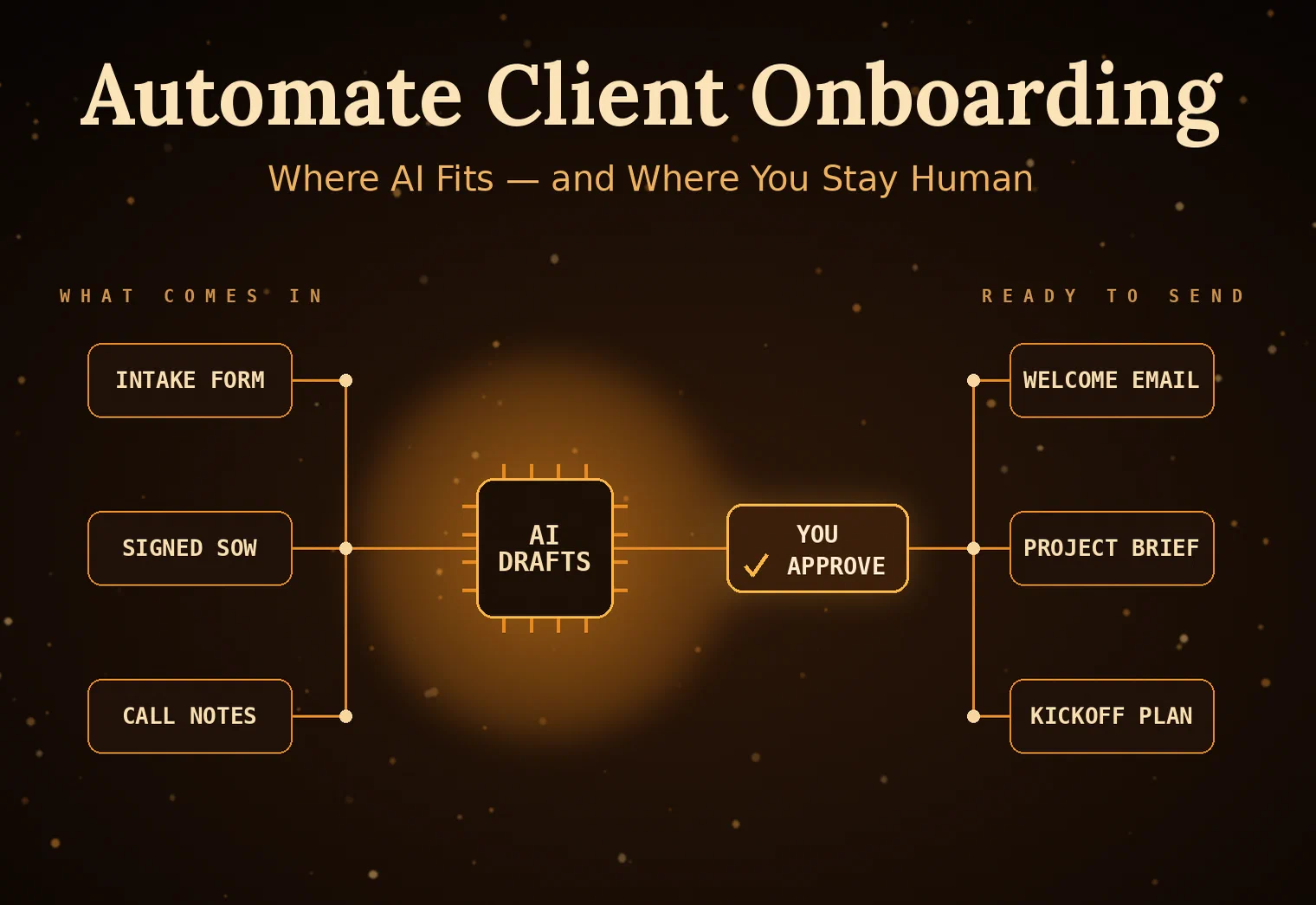
Onboarding is the part of the engagement nobody quotes for and everybody pays for. Between the welcome email, the intake form, the kickoff scheduling, the document collection, and the ten small clarifications that follow, a single new client can eat the better part of a day before you’ve done a minute of billable work. It’s also the first impression, so it’s exactly the wrong place to look rushed or disorganized. AI is genuinely good at this now, not because it can charm your client, but because most of onboarding is the same handful of steps repeated with different names in the blanks. Here’s how to automate the repeatable parts without making it feel like a robot answered the door.
Map the Onboarding You Already Have
Before you automate anything, write down what actually happens between “they said yes” and “we started the work.” Not the idealized version, the real one. For most small shops it’s some mix of: send a welcome note, collect intake information, sign the agreement, schedule a kickoff, request access and assets, and set up a project or channel. Half of it is copy-paste with substitutions, and the other half is chasing people for things they forgot to send.
That map is the whole job. Automation doesn’t reward you for being clever; it rewards you for knowing your own process well enough to describe it in steps. Once you can see the sequence written out, the automatable parts announce themselves: anything that’s the same every time, anything triggered by a predictable event, and anything where you’re mostly reformatting information a client already gave you.
Where AI Actually Earns Its Keep
The mechanical steps automate without AI at all; a form and a few scheduled emails handle scheduling and reminders fine. Where AI specifically pulls its weight is the language-shaped work in between. Turning a messy intake response into a clean project brief. Drafting the personalized welcome email that references what the client actually said instead of a mail-merge blank. Reading the signed SOW and generating the kickoff agenda, the task list, and the first-week checklist from it. Summarizing a discovery call transcript into action items before you’ve closed the laptop.
Those are the tasks that used to require you, specifically, sitting down and writing. They’re bounded and verifiable, meaning there’s a clear finish line and you can tell at a glance whether the output is right, which is exactly where these tools are reliable. Point an AI step at “here’s the intake form, draft a project brief in our format” and you get a solid first draft in seconds that you edit rather than author. Across every new client, that reformatting-and-drafting layer is where the hours quietly go, and it’s the layer AI removes.
A Setup You Can Build This Month
You don’t need a platform. A workable version wires together tools you probably already pay for: an intake form as the front door, an automation tool like Zapier or Make as the plumbing, and an AI step in the middle for the language work. New submission comes in, the AI drafts the brief and the welcome email, a scheduling link goes out, a project gets created from a template, and you get a single notification asking you to review and send. You stay in the loop at exactly one point, the approval, instead of at all six.
Start with one step, not the whole pipeline. Automate the welcome-email draft first, live with it for a few clients, and only then add the next link. The teams that try to build the entire flow in a weekend end up with a brittle machine they don’t trust and quietly stop using. The teams that add one reliable step at a time end up, a couple of months later, with an onboarding that mostly runs itself and still sounds like them.
Keep It Human Where It Counts
The failure mode here isn’t dramatic; it’s a client who feels processed instead of welcomed. So draw a hard line between the parts that should be automated and the parts that shouldn’t. Reminders, scheduling, document collection, and first drafts: automate freely. The actual welcome, the first real conversation, the moment where you show you understood their problem: keep those human, always. AI should be buying back the time you spend on logistics so you can spend more of it on the client, not less.
Review everything before it goes out, at least until you’ve seen a given step behave the same way a dozen times. A wrong name or a hallucinated detail in a welcome email is a worse first impression than a slightly slower reply. Done well, though, automated onboarding is one of the highest-return things a small shop can build, because it compounds on every single client you take. If you’re trying to figure out which parts of your process are worth automating and which are better left alone, that’s exactly the kind of thing we help small businesses sort out at FMLY Consulting.